Mac posture apps: camera or AirPods?
Every posture app for Mac has to see you somehow. Most use the built-in camera; a newer group reads your head angle from AirPods. The choice decides how private, how accurate and how annoying the app will feel by the third day.
 By Relja Bulajić, who builds AirPostureUpdated 7 min read
Short answer
If you wear AirPods at your desk, an AirPods-based app is the lighter choice: no camera, no lighting to worry about, and it keeps working when you look away from the screen. If you don't wear AirPods, a camera app is the only way a Mac can see your posture.
Whichever you pick, judge it on one thing: does it stay quiet when you sit well? A posture app you mute on day two does nothing.
Three ways a Mac app can watch your posture
1. The camera
The app watches your face and shoulders through the FaceTime camera and notices when your head drops or comes closer to the screen.
- Good: nothing to wear, and it can see your shoulders as well as your head.
- Costs you: the camera stays on all day. It needs decent light and you in frame, and analysing video takes more power than reading a sensor.
2. Your AirPods
AirPods 3, AirPods 4, AirPods Pro and AirPods Max carry the motion sensors Apple uses for spatial audio. A Mac app can read your head angle from them, many times a second.
- Good: no camera, works in any light, and follows you when you turn to a second screen or lean back.
- Costs you: your AirPods have to be in, and they see your head, not your lower back. Reading papers flat on the desk looks like a slouch to them.
3. A timer
Break reminders go off every so many minutes. They are simple and useful for getting up, but they can't see you at all, so they fire whether you are slouching or not.
Which apps use which
Checked in October 2026. Prices and features change, so check the App Store before you buy.
| App | Sees you with | How it tells you | Price |
|---|---|---|---|
| AirPosture | AirPods | Menu bar score, a calm voice, a panel from the notch | Free 2 h a day, Premium for all day |
| Posture Pal | AirPods and some Beats | Sounds, notifications, lowering your music | Free, Pro $19.99 once or a subscription |
| Dorso (also listed as Posturr) | Camera or AirPods | Blurs the screen as you slouch | Open source (MIT) |
| Nekoze | Camera | A cat on screen | Free, last updated 2022 |
A pattern shows up in what people say about camera apps. When Posturr, the earlier name of Dorso, was discussed on Hacker News, the recurring worries were a camera that is always on and the processor time it used (the developer cut it sharply afterwards). Nekoze's App Store reviews mention detection trouble with glasses, poor light and external webcams.
How AirPosture works on a Mac
AirPosture is the AirPods kind. It lives in the menu bar with a live score, speaks through your AirPods only when a slouch holds, and on MacBooks with a notch, a small panel folds out of the notch and hides again when you sit up. The camera is never used.
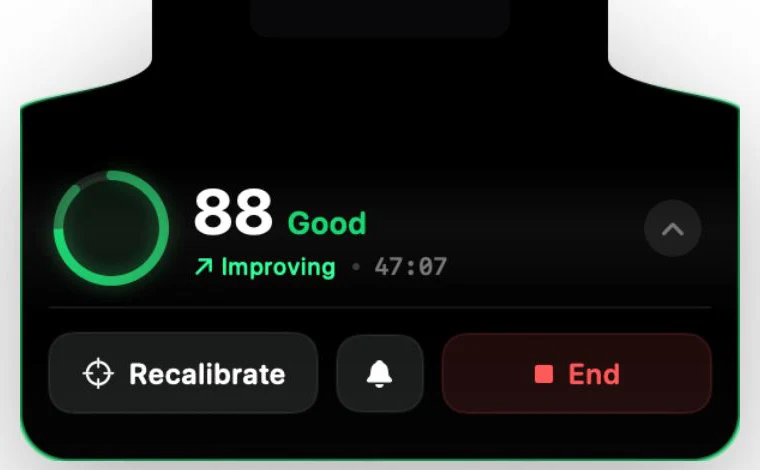
The full walkthrough is in the Mac guide. If you also use an iPhone, the same coach works there with the phone locked.
How to choose
- Do you wear AirPods at the desk?If yes, start with an AirPods app. If not, a camera app is your option.
- Are you comfortable with the camera on all day?Some people are, many aren't. It is worth deciding before you get used to an app.
- Does it stay quiet when you sit well?Give it one full workday. If it interrupts you while you are sitting fine, it will end up muted.
- Does it follow you off the desk?If you also slouch over your phone, an app that works on iPhone too covers more of the day.
Questions people ask
- Do Mac posture apps need the camera?
- Only the camera-based ones. Apps that use AirPods read your head angle from the earbuds' motion sensors and never turn the camera on.
- Which AirPods work with Mac posture apps?
- AirPods 3, AirPods 4, any AirPods Pro and AirPods Max have the motion sensors. AirPods 1 and 2 don't. Reading AirPods motion on a Mac needs macOS 14 or later.
- Will a posture app slow my Mac down?
- Camera apps have to analyse video all day, which costs more than reading a few angles from AirPods. Either way, check the app in Activity Monitor during the first day.
- Is a break timer enough?
- A timer reminds you to move, which is useful. It can't tell whether you are slouching, so it interrupts you when you sit well and stays quiet when you don't.
A coach in the menu bar, not a camera.
AirPosture reads your AirPods, stays quiet while you sit well, and folds out of the notch when a slouch holds.
Download AirPosture, free to startFree to start · iPhone & Mac · works with AirPods 3, 4, Pro and Max