A posture app for your Mac that stays out of the way.
Most posture apps on the Mac either watch you through the camera or nag on a timer. AirPosture does neither. It reads your head angle from your AirPods and only speaks up when a slouch holds.
 By Relja Bulajić, who builds AirPostureUpdated 5 min read
In short
AirPosture for Mac lives in your menu bar. Wear AirPods 3, AirPods 4, AirPods Pro or AirPods Max, start a session, and it follows your head angle while you work.
When you sink into a slouch and stay there, a calm voice in your AirPods tells you, and on MacBooks with a notch a small panel folds out of it. It needs macOS 14 or later, never uses the camera, and works alongside the iPhone app.
Why not a timer, or the camera?
The two usual ways to get posture reminders on a Mac both have a catch.
- Timers go off every 20 or 30 minutes whether you are slouching or not. After a few days you dismiss them without looking.
- Webcam apps need the camera on all day, decent light and you in frame. Lean back, turn to a second screen or take a call from the couch, and they lose you.
AirPods sit on your head, so they measure the head directly, wherever you are facing. Most people already wear them for calls and focus music. Nothing new to buy, set up or charge.
What it looks like on the Mac
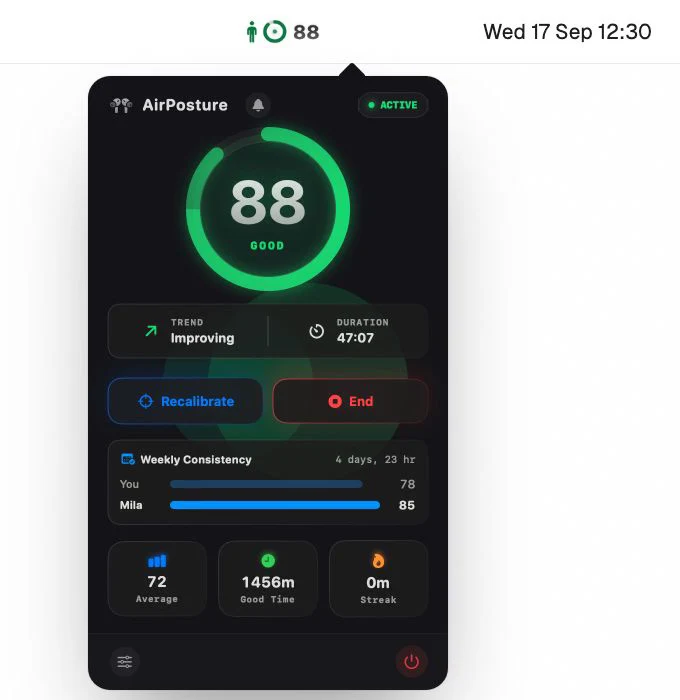
The menu bar
Your score sits next to the AirPosture icon while a session runs. Click it for the details: the score, whether you are improving, how long the session has been going, and buttons to recalibrate or end.
The notch
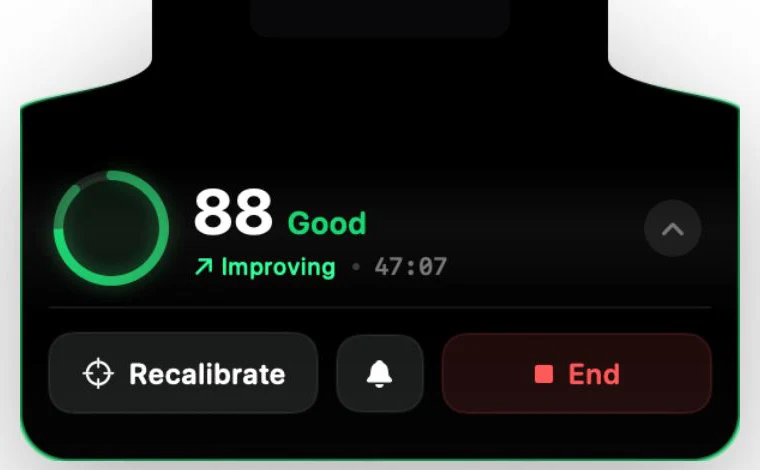
When a slouch holds for a few seconds, a small panel folds out of the notch with your score. Sit up and it folds away again. It won't come back for at least 90 seconds, so it reads as a tap on the shoulder, not a metronome.
The voice
The coach that speaks on iPhone speaks on the Mac too, quietly, in your AirPods. The first time you slip it says a short line like “Lift your chin.” After that, a soft tone is enough.
The window
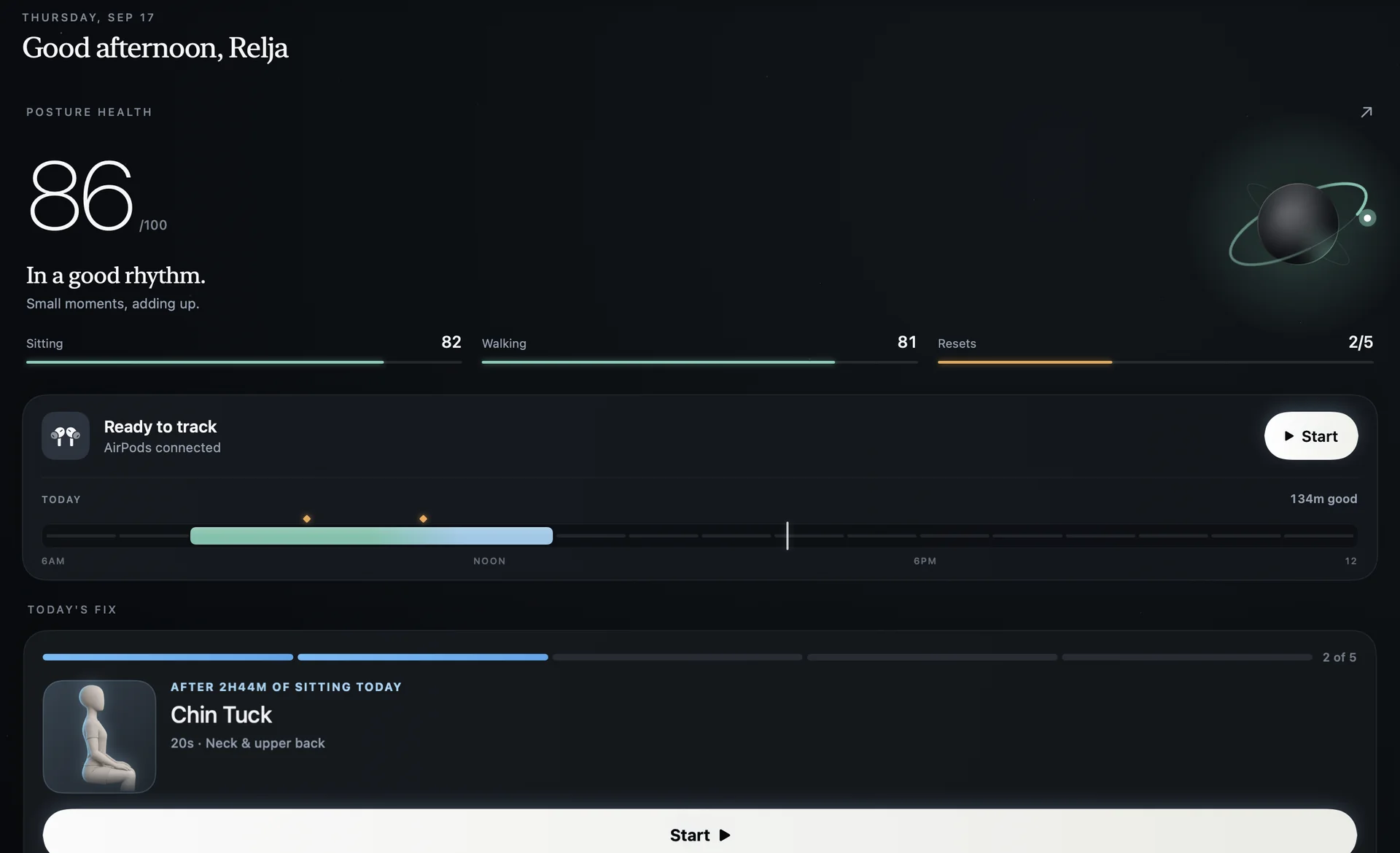
Open the app window when you want the bigger picture: your Posture Health score, good posture time today and the next suggested reset. With Premium, Insights shows how your week went.
Set it up in a minute
- Install AirPosture from the Mac App Store.It is the same app as on iPhone. You need macOS 14 Sonoma or later.
- Connect your AirPods to the Mac.AirPods 3, AirPods 4, AirPods Pro or AirPods Max. Older AirPods have no motion sensors.
- Sit tall and set your upright.Everything after that is measured against how you sit, not a textbook angle.
- Start a session from the menu bar.Then forget about it until it has something to say.
A few honest limits
- It tracks your head and neck, not your lower back. If you slump at the waist but keep your head level, it won't see it.
- Looking down at notes for a moment is fine. The coach waits for the angle to hold before it says anything.
- It is a posture coach, not a medical device. If something hurts, see a physiotherapist.
Want the details on the sensors themselves? Read can AirPods track your posture?
Questions people ask
- Does it work on a Mac without a notch?
- Yes. Tracking, the coach's voice and the menu bar work on any Mac with macOS 14 or later. The panel that folds out of the notch appears on MacBooks that have one.
- Does it use my Mac's camera?
- No. AirPosture reads only the motion sensors in your AirPods. The camera stays off.
- Do I need the iPhone app too?
- No. The Mac app tracks on its own. If you use both, your history comes along to the other device.
- Is it free?
- AirPosture is free for two hours of coaching a day, including the voice and the notch panel. Premium removes the daily limit.
A quiet coach for desk days.
Put your AirPods in, sit tall once, and get back to work. It will tell you when you drift.
Get AirPosture for Mac, free to startFree to start · iPhone & Mac · works with AirPods 3, 4, Pro and Max